The way most computers get infected with computer virus and other type of malware is via USB or pen drive. If you open a USB drive on your computer without scanning it first with an antivirus, there is a very high probability that your computer will get infected.
The mechanism of malware that spread through or USB or pen drive is dependent on a hidden system file in it called autorun.inf.
When you attach the USB drive to your computer, your computer reads the autorun.inf file and executes any programs listed in it. A virus adds its execution information in autorun.inf file so that it runs automatically whenever you use the infected USB drive.
A simple way to prevent the infection from a USB or pen drive is to delete the autorun.inf file in it as soon as its attached to the computer. This can be done manually if the autoplay of USB drive is disabled and the computer is configured to show hidden files and folders.
An easier way is to use a small utility called AutorunEater. AutorunEater is a freeware that scans a USB or pen drive as soon as it is attached to the computer. If an autorun.inf file is found it will show you a warning if a malicious file is being executed from it. You can then delete the autorun.inf file so that the malicious command do not get executed.
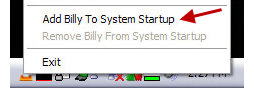
You can download the AutorunEater from this link. After installing it, right click on its icon in the notification area and click on Add Billy To System Startup option.
Nice post this is helpful for me cheers…
Very useful thing. Most viruses come from pen drives…
hi
Hi Ajay :)
hi, mayur
very use full trick mayur
mayur do u know sim card programing
reply
@sachin
Why do you wanna know bro? :)
Nice post
Thanks for the info
If your HDD is mounted it can be infected by virus unknown to your anti virus. So we need to check USB WITHOUT mounting HDD! By disabling autorun you will postpone virus start till you click on USB icon.