You join the cafe Wi-Fi, and within seconds your phone has told the network a lot about you. Which apps you use, which servers they talk to, roughly how often. The site itself may be encrypted, but the pattern of connections is still out in the open, and on some networks half the sites you want simply refuse to load.
That gap between “encrypted” and “private” is what traffic analysis lives in. Knowing who talks to whom, and when, is often enough to build a profile without ever reading a single message.
Orbot exists to close part of that gap on Android. It is a free proxy app, published under the name The Tor Project, and listed in the Communication category of the Play Store. Instead of securing one website at a time, it hands the Tor network to your other apps, encrypting their traffic and bouncing it through a chain of volunteer-run computers around the world before it reaches its destination.
The Onion Routing Behind Orbot
Tor is open software and an open network, and the design is deliberately layered. Your traffic gets wrapped in several layers of encryption, then passed through a series of relays. Each relay peels off one layer and knows only the hop before it and the hop after it. No single machine in the chain sees both who you are and what you asked for.
Orbot’s job is to run that client on your device and make the resulting circuit available to apps. The original approach was a local SOCKS proxy that proxy-aware apps could point at. Later builds added a VPN-style mode, which is how most people use it now, because it catches apps that have no proxy settings of their own.
The practical result is that privacy stops being an app-by-app negotiation. You turn Orbot on and decide what rides through it.
Picking Which Apps Ride the Tor Circuit
The per-app control is the part people underuse. Routing everything through Tor sounds thorough, but it makes banking apps nervous, breaks push notifications, and slows down things that gain nothing from anonymity.
A more sensible split usually looks like this:
• Messaging and browsing apps, where metadata about who you contact matters most
• News readers and research tools on networks that filter content
• Apps you only use occasionally and would rather not tie to your home IP
• Anything that needs to reach a .onion address directly
• Left outside the tunnel: banking, maps, media streaming, and anything that already knows exactly who you are
Orbot also lets you request a new identity, which tears down the existing circuit and builds a fresh one. Useful when an exit node lands you in a country whose version of a site you did not want.
Orbot: Proxy with Tor on a Windows Machine
Plenty of people would rather keep this running on a desktop, where the screen is bigger and the machine stays plugged in. Tor itself has native desktop software, but the Android build behaves differently, and some users specifically want the per-app toggles and the Android apps that sit behind them.
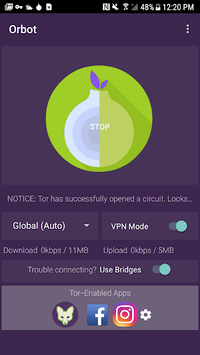

Running the Android version on a desktop means putting it inside an Android environment such as BlueStacks, and the usual caveat applies: Orbot for Windows runs inside that virtual Android layer, so it tunnels the apps installed alongside it in that environment, not your Windows browser or your Windows programs. Worth knowing before you expect system-wide coverage on the PC.
For older hardware, the store listing points to the Guardian Project release archive and to F-Droid for builds that still support Android 4.0 and earlier. Those legacy versions are relevant if you are reviving an old handset rather than running the app on a current machine.
Bridges, Firewalls, and the Speed You Give Up
Some networks block connections to known Tor relays outright. Orbot handles that with bridges, which are unlisted entry points, including obfuscated transports that make the traffic look less like Tor to whatever is doing the blocking. This is the feature that matters most to anyone on a restrictive school, office, or national network, and it is the reason the app’s own summary talks about breaking through firewalls.
The cost is speed. Three hops across continents will never match a direct connection, and video in particular suffers. Expect pages to load in a couple of seconds rather than instantly, and expect the occasional CAPTCHA from sites that treat exit nodes with suspicion.
There is also the boring but important limit: Orbot protects the transport, not what you do over it. Log into an account tied to your real name and the circuit has nothing left to hide.
Journalists and researchers on filtered networks, people dealing with a nosy ISP or a censored connection, and anyone who wants a handful of apps anonymized without signing up for a commercial VPN will find the three-hop detour worth the wait. On a trusted home connection, it mostly just slows things down for no reason.