Photos captured using Kodak cameras are usually stored in PCD (Kodak Photo CD) format. PCD format is a very efficient format to store images. However, PCD format is not supported by most of the image editors like Photoshop and Gimp. This is because PCD is a proprietary file format developed by Kodak. So, third part image editors can’t include support for it.
One way to use PCD images with image editors is to first convert it into a commonly used image format like jpeg. You can easily convert PCD images to jpeg by using this free, command line utility, pcdtojpeg.
You can use pcedtojpeg on windows, Mac, Linux, or even on pure flavours of Unix like FreeBSD.
Following are some of the features of pcdtojpeg
1. It easily translates PCD format to jpeg without loosing highlighting information. For instance, in the first image is converted using some other pcd conversion software, you can easily see the blown highlights. The other, normal one, is converted using pcdtojpeg.
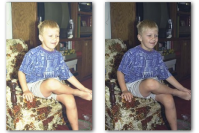
2. It converts the image at its full resolution. It can even convert the class 3 images (high resolution images with text and graphics) without any problem.
3. Colors are not changed after conversion.
4. It includes all the metadata from the PCD image into the jpeg image.
5. It is very fast :)
If you are a programmer and you want to include pcdtojpeg into your software, you can use a C++ PCD decoder library for that purpose.
Download pcdtojpeg from this page.
Note that since its a command line utility, read its usage instructions carefully.
Blown John image credits goes to Ted Felix
Thanks for this tip – it really makes a difference when comparing to – for example – Irfanview!
I wrote a little script to automate the process on my Mac that I’d like to share – please note that you’ll have to change the directory variable(s) to fit your environment. Should work directly in Linux Bash as well.
# script to automate pcdtojpeg binary to convert all PCD files in a directory
# variables in:
# $1 = directory of Photo CD contents, assuming it lies in $PHOTOCD_DIR for all PHOTO CD Directories
# it redirects all output to a file named after the photo CD dot txt
#!/bin/bash
PHOTOCD_DIR=/Volumes/iMac_Data/Bilder/PhotoCD
APP_DIR=/Applications/Tools
FILES=$PHOTOCD_DIR/$1/*.PCD
for f in $FILES
do
$APP_DIR/pcdtojpeg -v -r 5 $f &> $PHOTOCD_DIR/$1.txt
#cat $f
done
@Hans Baumeister
Thanks a lot for sharing your script. I am sure Mac and Linux users will find it very handy.