There are times when we need to copy something from command prompt or paste something to it. And if you are a command prompt hacker then you must have cursed windows for lack of copy/paste support in command prompt.
Well, stop cursing and start learning, following are two ways to select, copy and paste in command prompt. The first one involves enabling the QuickEdit Mode in command prompt, while the other involves using some menu options available in the command prompt.
How To Enable Quick Edit Mode in Command Prompt
1. Open Command Prompt.
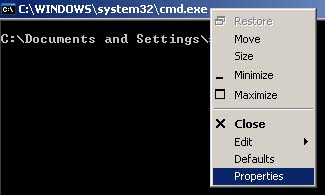
2. Right click anywhere on the title bar of command prompt window, and click on properties.
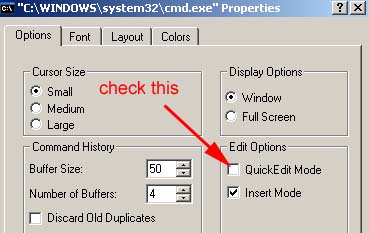
3. In the Options tab, Check the QuickEdit Mode option.
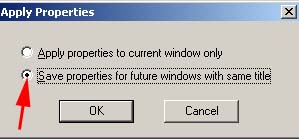
4. When you’ll press OK, a dialog will be displayed. In this dialog, select Save properties for future windows with same title option, and press OK.
This procedure will enable the quick edit mode in command prompt.
Now, how to select, copy and paste from a quick mode enabled command prompt window?
To copy anything from command prompt, simply select the pointer by dragging it over the text, then press Enter or Right Click on your mouse. This will put the selected text into clipboard.

To paste anything into command prompt, simply right click on it.
Use In-Built Menu Options
1. Open Command Prompt.
2. Right click anywhere in the command prompt window, and select Mark.
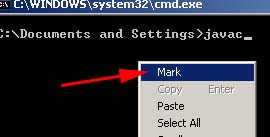
Mark option can also be selected by right clicking on the title bar of the command prompt and choosing Edit->Mark
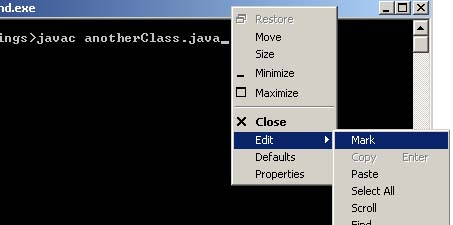
Now, simply drag the mouse pointer to select the text, then press enter or the right click on your mouse to copy the selected text to clipboard.
To paste the text into command prompt, simply right click anywhere on it and click paste.
Hello to all ! Great site. I am new here greetings to all from Poland.
You are welcome :)
muito obrigado, estava aflito já com tarefas para conclusão de curso “TCC”, apanhando para configurar uma conexão com o MYSQL, agora estou no trilho novamente! fiquei muito grato por esse seu esforço filantrópico e parabéns pela beleza estética também da matéria!!!.
Obrigado pelo feedback.