VLC media player, the Swiss army knife of all media players out there, has one more feature that you probably don’t know. You can play YouTube videos in it!
Its really easy to play youtube video in VLC media player. Start it, then go to Media > Open Network Stream Or simply press ctrl+N shortcut to open the network streaming window. Now in the Address field, paste the YouTube video URL that you want to play in VLC player. Leave the protocol and port fields blank.
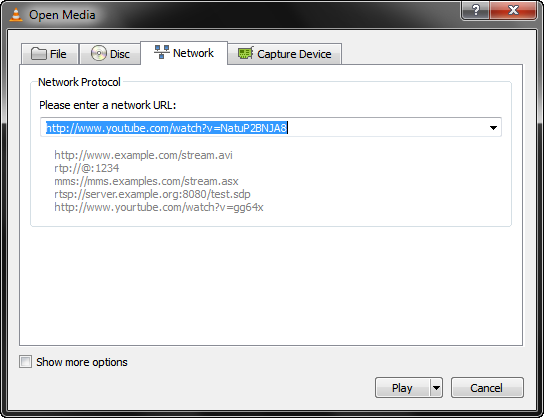
Click Play and the video will start playing instantly! You won’t see any difference in the playback. It will look as if you are playing a file stored on your computer.
Check out this video tutorial on playing YouTube video in VLC Media Player.
Playing YouTube Playlist in VLC Media Player
If you try to play a YouTube playlist in the vlc media player, it will not work. But there is a workaround. Download this file and save it in the /lua/playlist folder inside your vlc installation folder. After copying this file, restart vlc once and then you can just paste the playlist url in the network streaming window, as explained above, and the videos in the playlist will play one by one.
Why Watch YouTube Videos in VLC?
Since a YouTube video playing inside VLC media player is not different then any other video stored locally, you can use all VLC media player features on YouTube video.
• You can set the video as a wallpaper using VLC. So you can work while the video plays in background as a wallpaper.
• If you want to watch the video while working, you can put the video in foreground, instead of background. To do so, select Video > Always on Top.
• If you want to repeat the video again and again in a loop, you can easily do that using the repeat feature of VLC.
• You can load subtitles in VLC and they will display with the YouTube video.
• If you are annoyed by streaming ads playing between the videos and the adsense pop-up ads that display while you play a YouTube videos, then playing YouTube video in vlc media player is best for you as it lets you watch YouTube videos without ads.
In short, you can use any features of VLC media player on the YouTube video, if you play it inside the VLC media player.
Update: You can play youtube videos only on VLC media player version 1.1 and above.