Your friend recently posted a picture on Facebook and tagged you on it. That’s nice! But what if that is the picture you don’t like? It will appear in your pictures on Facebook whether you like it or now. There is only one way to get rid of this issue. Untag yourself from that picture.
How To Remove Tag From a Picture on Facebook
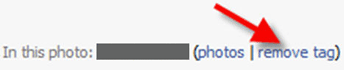 Go to your Profile page. Then click on the View Photos of Me link under your profile pic. Locate the picture that you don’t like in it. Then click it. Under this photo, there will be a list of all the people who have been tagged in it. Find out your name in it, and then click on the remove tag link in the brackets. That’s it. You have just untagged yourself from a photo and it will no longer appear in your pictures.
[Note that after you have untagged yourself from a picture, the picture will still be there in your friend’s album. It will just not appear in your pictures]
Is there any way to find who has tagged you on facebook?
@Nikesh
To find out who tagged you on a photo, click on the photo. It will take you to the photo album of the person who tagged you in that photo. Hope that helps.
CAN FRIENDS SEE YOU HAVE UNTAGGED?
@MELISHA
They can if they go to that photo to check. There is no automatic notification email.