Although the Gamil chat has the feature to be invisible and still stay online, the Google Talk desktop client still lacks this feature. But sometimes its necessary to appear invisible to selected friends to stay away from unnecessary interruptions.
Until Google implements this feature for GTalk, here’s a trick. You can stay always idle on GTalk. Once you appear idle, you are free to choose if you don’t want to reply to a friend’s chat without offending her, since she will think you are away from your computer (because of the idle status on GTalk :) )
How To Remain Always Idle On Google Talk
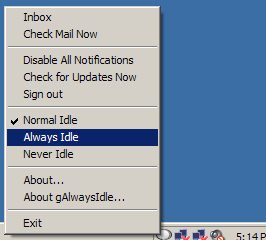 To always appear idle on GTalk, download and install gAlwaysIdle software. It will add a couple of options to your GTalk’s context menu. Just right click on its icon in the notification area and choose Always Idle and the green dot will instantly turn orange, indicating that you are away and thus keeping your friends off pinging you.
Update –The official website for the gAlwaysIdle software is down for some time now. But don’t worry, you can download the software from this link.
I have been using this software for quite long and this is very useful.
Though I missed the invisible feature so I prefer Google lab now a days because when you are blogging you can’t afford to get disturbed in between
TFS! :)
I think you are thinking like sukrat, but I think you should cover the other side of the topic in the post too…