If you have good observation then you must have noticed that whenever you type, http://www.google.com, in your browser’s address bar, you are redirected to the local Google domain of your country. For example, if you are in India, you will be redirected to http://www.google.co.in.
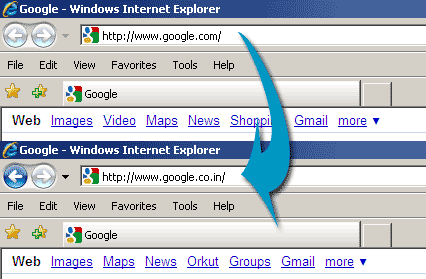
This is really annoying if you are traveling and are in a country which uses language other then English. For instance, if you are in France, then typing http://www.google.com will redirect you to http://www.google.fr, with all the interface in French!
Another thing is that Google’s search results vary slightly depending upon your country. So if you are using Google from India(http://www.google.co.in), you will see slightly different results then the results from Google for US(http://www.google.com). The sponsored listings (adwords ads) are completely different in different countries.
So, for some reason if you want to use http://www.google.com instead of your local Google, then you can do that easily. Just use the URL http://www.google.com/ncr in your browser’s address bar. Here ncr stands for No Country Redirect. Once you load that URL in your browser, it will create a cookie in your browser, which will stop redirection from Google.com to local Google domain.
To start the redirection again, just clear your browser cookies.
Really nice trick, I was annoyed with the endings in Germany!
Thanks – I wanted to investigate US pricing compared to Canadian pricing. Stuff in US is often cheaper than in Canada. Often results are skewed according to the Google Local domain. – Gary