You must have been seeing opp-up windows messages and dialogs in windows almost everyday. These messages tell us what we need to do or what went wrong. But sometimes these messages are very complex.
The first approach to find the meaning of a complex windows error message is to Google it. However, you can’t select text from the pop-up window messages and dialog boxes. The only way is to type it manually in the Google Search Box.
Not any more. The next time you see an error message dialog, just press Ctrl + C and all the text on the dialog will be copied to clipboard. Now just open notepad (Start > Run, write notepad and press Enter) or any other text editor, and paste the text into it by pressing Ctrl + V. You can also paste it directly on Google.
To illustrate this, I created an error message dialog on purpose(Start > Run, type whatever you like and press Enter), copied the error message and pasted it in notepad,
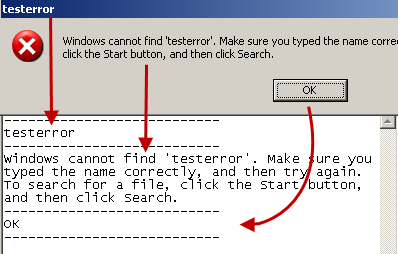
You can see that everything from the dialog gets copied, including the button’s text.
Check out the video below that show how you can copy the text from pop-up window messages and dialog boxes by simply pressing Ctrl+C.
This trick to Copy Text From Pop-up Window Messages and Dialog Boxes works in all versions of Windows including Windows 7.
Not working. use video please.
It may not work if the error dialog comes from a third part application. It works only with the dialogs shown by windows.
I’ll post a detailed tutorial on copying text from all dialogs soon. So, stay tuned!
Wow.. that’s a nice one!
How come Microsoft included such nice features in Windows and never told us about it? :P
@Phanindra K
Well, Microsoft told me to tell everybody. Stay tuned to HackTrix to find out more such “hidden” stuff :)
Sweet! Thanks for the tip, works like a charm in XPSP3