Whenever you want to login to any website and you type your password in a web form, you see only asterisks instead of actual password characters. This feature is implemented by web browsers to save you from shoulder surfing.
But sometimes, you do need to make sure that the password that you are typing is correct. For example, most online banking services will lock your account if you enter wrong password more then 3 times.
But how can you make sure that the password you entered is correct? Is there a way to reveal the actual password behind those asterisks?
How To View The Password Hidden Behind Asterisks
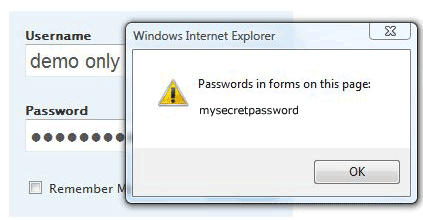 There are many software available that help you to see the actual password. However, the easiest way is to use the View Password bookmarklets.
Just add any one of the following View Password bookmarklets into your bookmarks, and then just click on it whenever you want to see the password behind the asterisks.
• The first bookmarklet can reveal the password of all password fields including the fields in dialog boxes. However, this bookmarklet sometimes can’t detect the password fields in Iframes.
View Passwords Behind Asterisks
(Drag it on your bookmarks bar)
• The following bookmarklet works just like the above, except that it will display the actual text behind the password on a new web page. Also, it works perfectly with Iframes as well.
View Passwords Behind Asterisks
(Drag it on your bookmarks bar)
That’s it. You can easily view the hidden password behind the asterisks now!